> ## Documentation Index
> Fetch the complete documentation index at: https://ngquct-feat-table-folders-sync.mintlify.site/llms.txt
> Use this file to discover all available pages before exploring further.
# Connection URL Reference
> Every supported database URL scheme, format, and query parameter for imports and direct connections
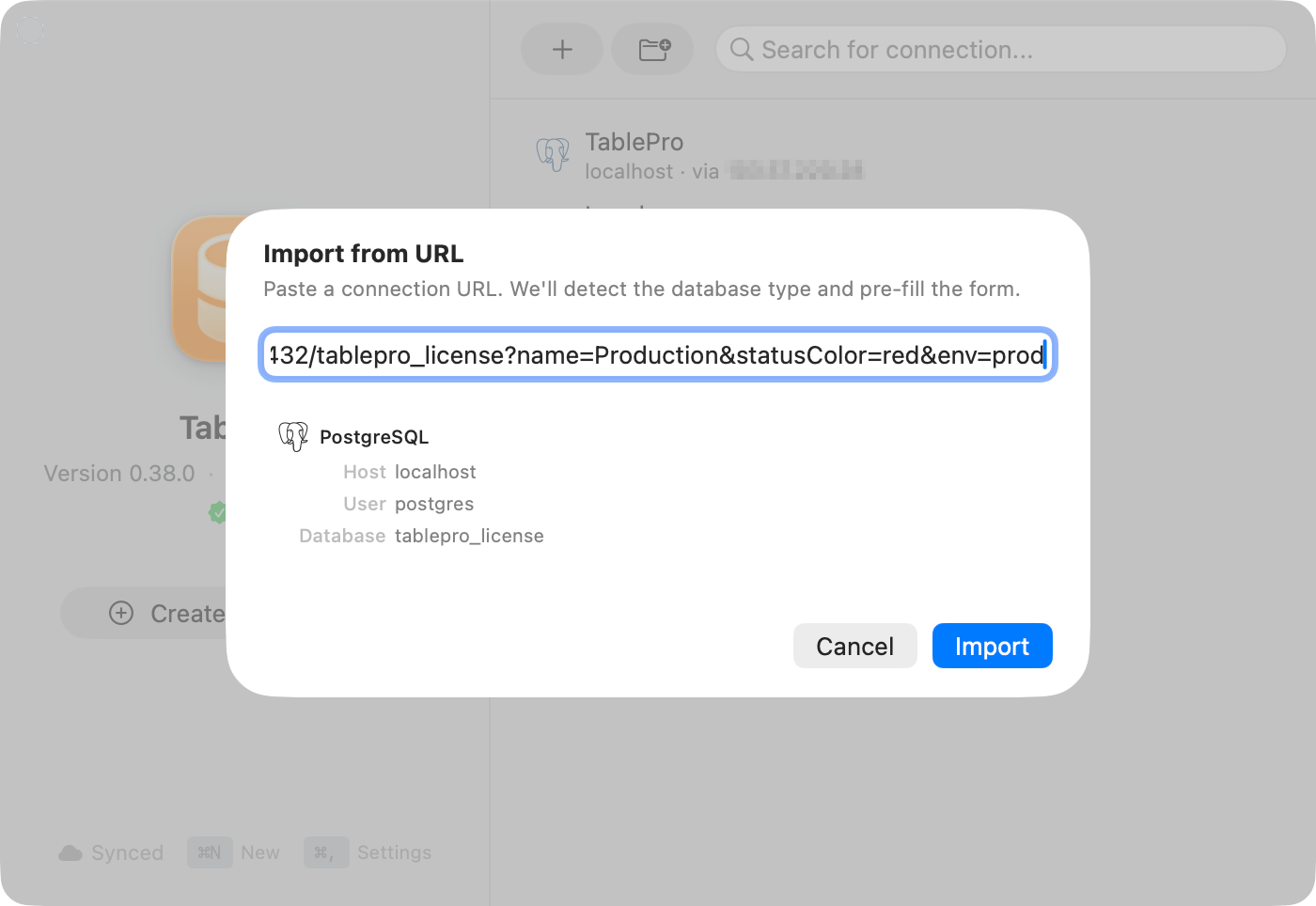
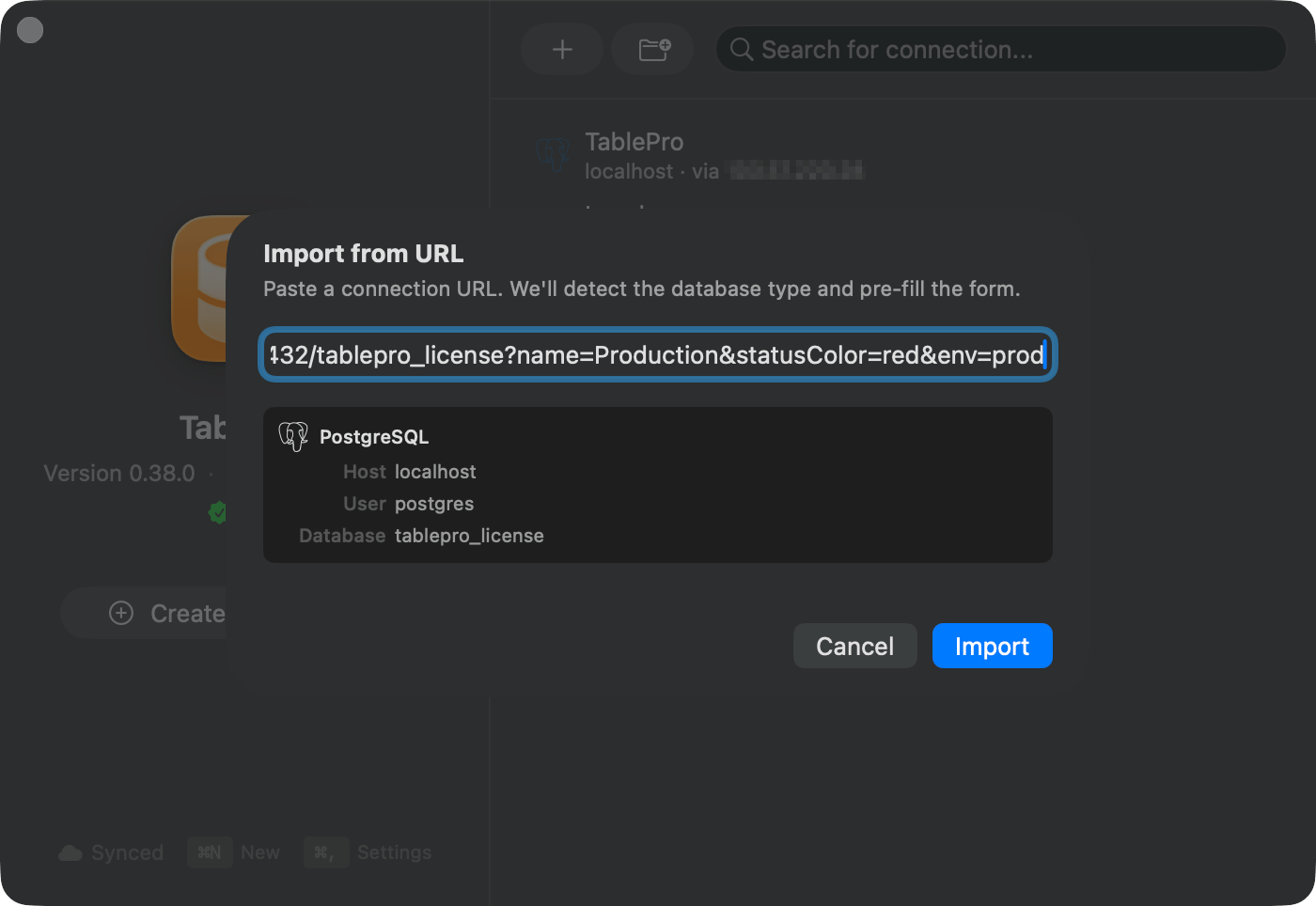
Two readers take these URLs, and not the same set. The **Import from URL…** sheet accepts every scheme in this reference, while `open` and browser links reach TablePro only through the ones it registers with macOS.
 ## URL schemes
| Scheme | Database | `open` |
| - | - | :-: |
| `postgresql://` | PostgreSQL | Yes |
| `postgres://` | PostgreSQL (alias) | Yes |
| `mysql://` | MySQL | Yes |
| `mariadb://` | MariaDB | Yes |
| `tidb://` | TiDB | Yes |
| `oceanbase://` | OceanBase | Yes |
| `sqlite://` | SQLite | Yes |
| `mongodb://` | MongoDB | Yes |
| `mongodb+srv://` | MongoDB (SRV) | Yes |
| `redis://` | Redis | Yes |
| `rediss://` | Redis with TLS | Yes |
| `redshift://` | Amazon Redshift | Yes |
| `cockroachdb://` | CockroachDB | Yes |
| `cockroach://` | CockroachDB (alias) | Yes |
| `pglite://` | PGlite | No |
| `mssql://` | Microsoft SQL Server | Yes |
| `sqlserver://` | Microsoft SQL Server (alias) | Yes |
| `jdbc:sqlserver://` | Microsoft SQL Server (JDBC) | No |
| `oracle://` | Oracle Database | Yes |
| `dm://` | Dameng DM8 | Yes |
| `hdb://` | SAP HANA | No |
| `jdbc:oracle:thin://` | Oracle Database (JDBC thin) | No |
| `cassandra://` | Cassandra | Yes |
| `cql://` | Cassandra (alias) | Yes |
| `scylladb://` | ScyllaDB | Yes |
| `scylla://` | ScyllaDB (alias) | Yes |
| `clickhouse://` | ClickHouse | Yes |
| `ch://` | ClickHouse (alias) | Yes |
| `teradata://` | Teradata | No |
| `trino://` | Trino | No |
| `duckdb://` | DuckDB file | Yes |
| `quack://` | DuckDB remote (Quack protocol) | No |
| `beancount://` | Beancount ledger file | No |
| `etcd://` | etcd | Yes |
| `etcds://` | etcd with TLS | Yes |
| `d1://` | Cloudflare D1 | Yes |
| `libsql://` | libSQL / Turso | Yes |
| `surrealdb://` | SurrealDB | Yes |
**Import from URL…** also takes a JDBC URL: `jdbc:` in front of a scheme above, such as `jdbc:trino://` or `jdbc:postgresql://`, is dropped. `user` and `password` parameters fill in the credentials when the URL has none before the host, as in `jdbc:postgresql://db.example.com/app?user=analyst`. A JDBC form with a protocol segment, such as `jdbc:ch:http://`, is not recognized.
Append `+ssh` to any non-file scheme (so not `sqlite`, `duckdb`, or `beancount`) to carry SSH settings in the same string:
```text theme={null}
postgresql+ssh://
mysql+ssh://
mariadb+ssh://
```
No `+ssh` scheme is registered with macOS, so `open` and browser links cannot route one. Import those through the sheet.
## Standard format
```text theme={null}
scheme://[username[:password]@]host[:port][/database][?param=value&…]
```
```text theme={null}
postgresql://alice:secret@db.example.com:5432/myapp
mysql://root@localhost/shop
mongodb://user:pass@mongo.host:27017/analytics?authSource=admin
redis://:password@cache.host:6379/1
sqlite:///Users/alice/data/local.db
```
If the URL is already in a project's `.env` file, [Open Project Folder](/features/project-folder-import) reads it for you instead of asking you to paste it.
Passwords containing `@`, `#`, `%`, or `:` must be percent-encoded. `p@ss#word` becomes `p%40ss%23word`.
A URL the parser cannot read is reported as `Could not parse database URL: …`, with the password stripped out of the echoed string.
## SSH tunnel format
Both sets of credentials go in one string, SSH first:
```text theme={null}
scheme+ssh://[ssh_user@]ssh_host[:ssh_port]/[db_user[:db_pass]@]db_host[:db_port][/database][?params]
```
```text theme={null}
postgresql+ssh://deploy@bastion.host:22/dbuser:dbpass@internal-pg:5432/mydb
mysql+ssh://ec2-user@jump.host/root:secret@10.0.0.5/shop
mariadb+ssh://admin@ssh.host/maria_user@db.internal/store?usePrivateKey=true
```
An omitted `db_host` defaults to `127.0.0.1`.
## Query parameters
Names are matched case-insensitively. Anything unrecognized is ignored, except on a MongoDB URL, where every unknown parameter is passed to the driver unchanged.
### Connection
| Parameter | Description | Example |
| - | - | - |
| `name` | Connection name shown in the sidebar, and part of what a trusted link is matched on | `?name=Production+DB` |
| `safeModeLevel` | [Safe Mode](/features/safe-mode) for this connection: 0=silent, 1=alert, 2=read-only | `?safeModeLevel=2` |
| `statusColor` | Connection color as hex, matched to the nearest palette color | `?statusColor=FF3B30` |
| `env` | Assign an existing tag by name. `environment` is accepted too | `?env=production` |
### SSL/TLS
| Parameter | Values | Description |
| - | - | - |
| `sslmode` | `disable`, `prefer`, `require`, `verify-ca`, `verify-full` | SSL mode under libpq's names, in any case and with `_` for `-`, so `VERIFY_FULL` works too. ClickHouse JDBC's `strict` and `none` read as Verify Identity and Required |
| `tlsmode` | `0`-`4` | The same modes as integers: 0=disable, 1=prefer, 2=require, 3=verify-ca, 4=verify-full |
| `tls` / `ssl` | `true`, `false` | `true` turns TLS on: Verify Identity for Trino and ClickHouse, Required for every other database. `false` sets Disabled, even on a port that means TLS |
| `SSLVerification` | `FULL`, `CA`, `NONE` | Trino's certificate check once TLS is on: Verify Identity, Verify CA, Required. Ignored while TLS is off. Verify CA also needs a CA certificate file |
`sslmode` or `tlsmode` wins over `ssl`, `tls` and `SSLVerification`. With none of them, a Trino URL on port `443` and a ClickHouse URL on `443` or `8443` import as Verify Identity, as in [Ports that mean TLS](/connections/ssl#ports-that-mean-tls), and every other URL takes the driver's default from [Per-driver defaults](/connections/ssl#per-driver-defaults). **Import from URL…** and a link opened from a browser or `open` resolve the mode the same way, so `ssl=false` or `sslmode=disable` is how a link asks for plain TCP. A URL that turns TLS on and names no port opens on the driver's TLS port, `443` for Trino and `8443` for ClickHouse, and a port written in the URL is kept.
```text theme={null}
postgresql://user:pass@host/db?sslmode=require
postgresql://user:pass@host/db?tlsmode=2
```
### Navigation
| Parameter | Description | Example |
| - | - | - |
| `table` | Open this table once connected | `?table=users` |
| `view` | Open this view once connected | `?view=active_orders` |
| `schema` | Switch here first | `?schema=reporting` |
On PostgreSQL, Redshift, SQL Server, and Oracle, `schema` switches the schema. Everywhere else the value is read as a database name and switches the database.
```text theme={null}
postgresql://user:pass@host/mydb?schema=reporting&table=monthly_sales
```
### Filtering
These apply a filter to the table the URL opened. Applying one needs its own confirmation.
| Parameter | Description | Example |
| - | - | - |
| `column` | Column to filter on | `?column=status` |
| `operation` | Filter operator. Symbols and names both work (`=`, `LIKE`, `Equal`, `Contains`, `Is Null`); `operator` is an alias for the parameter | `?operation=LIKE` |
| `value` | Filter value | `?value=active` |
| `condition` | Raw SQL WHERE condition, which overrides `column`, `operation`, and `value`. `raw` and `query` are aliases | `?condition=status%3D'active'` |
```text theme={null}
postgresql://user:pass@host/mydb?table=orders&column=status&operation==&value=pending
postgresql://user:pass@host/mydb?table=orders&condition=total%3E1000
```
### SSH tunnel
| Parameter | Description |
| - | - |
| `usePrivateKey` | `true` for key-based SSH authentication |
| `useSSHAgent` | `true` to authenticate through an SSH agent |
| `sshNoAuth` | `true` to send no credentials at all, for servers like Tailscale SSH. See [Authentication methods](/connections/ssh-tunneling#authentication-methods) |
| `agentSocket` | Path to a non-default agent socket |
```text theme={null}
postgresql+ssh://ubuntu@bastion/dbuser@10.0.0.5/mydb?usePrivateKey=true
```
### MongoDB
| Parameter | Description |
| - | - |
| `authSource` | Authentication database, `admin` by default |
| `authMechanism` | For example `SCRAM-SHA-256` |
| `replicaSet` | Replica set name |
Comma-separated hosts work for a replica set URI.
```text theme={null}
mongodb://user:pass@host:27017/mydb?authSource=admin
mongodb://user:pass@host1:27017,host2:27017,host3:27017/mydb?replicaSet=rs0
```
## What the path component means
The part after the host is the database name on most schemes. Seven read it differently:
| Scheme | The path is |
| - | - |
| `redis://`, `rediss://` | The database index, from 0 to 2147483646, and 0 when omitted. `db2` reads as 2, and any other path is refused |
| `cassandra://`, `scylladb://` | The default keyspace. Omit it to connect with none |
| `sqlite://`, `duckdb://`, `beancount://` | An absolute file path, so the URL carries three slashes |
| `quack://` | The alias a remote DuckDB server attaches the database under. See [DuckDB](/databases/duckdb) |
| `d1://` | The D1 database name or UUID, with the host as the Cloudflare account ID |
| `libsql://` | Nothing. The host is the database URL, and the auth token goes in the connection form's password field |
```text theme={null}
redis://:password@host:6379/2
cassandra://user:pass@host:9042/my_keyspace
duckdb:///Users/me/data/analytics.duckdb
quack://host:9494/alias
d1://account-id/database-name
libsql://your-database.turso.io
```
When another client also handles the scheme, `open -b com.TablePro "mysql://…"` forces TablePro. See [Terminal and DDEV](/external-api/terminal) for the `tablepro` command and the `ddev tablepro` host command.
## Confirmation and trusted links
Every URL opened from outside the app raises an **Open External Database Connection?** alert naming the database type, host and port, user, and database. **Connect** does not answer the Return key. Escape is the only keyboard answer, and it cancels.
**Always Allow** appears only for a database on this machine (`localhost`, `127.x.x.x`, `::1`). A trusted link is matched on database type, host, database, username, and the URL's `name` parameter, never the port, so the same link on a different port still connects without asking again. Remote hosts always prompt.
Trusted links are listed under **Settings > General**, where **Forget** drops one and **Forget All** drops every one.
## URL schemes
| Scheme | Database | `open` |
| - | - | :-: |
| `postgresql://` | PostgreSQL | Yes |
| `postgres://` | PostgreSQL (alias) | Yes |
| `mysql://` | MySQL | Yes |
| `mariadb://` | MariaDB | Yes |
| `tidb://` | TiDB | Yes |
| `oceanbase://` | OceanBase | Yes |
| `sqlite://` | SQLite | Yes |
| `mongodb://` | MongoDB | Yes |
| `mongodb+srv://` | MongoDB (SRV) | Yes |
| `redis://` | Redis | Yes |
| `rediss://` | Redis with TLS | Yes |
| `redshift://` | Amazon Redshift | Yes |
| `cockroachdb://` | CockroachDB | Yes |
| `cockroach://` | CockroachDB (alias) | Yes |
| `pglite://` | PGlite | No |
| `mssql://` | Microsoft SQL Server | Yes |
| `sqlserver://` | Microsoft SQL Server (alias) | Yes |
| `jdbc:sqlserver://` | Microsoft SQL Server (JDBC) | No |
| `oracle://` | Oracle Database | Yes |
| `dm://` | Dameng DM8 | Yes |
| `hdb://` | SAP HANA | No |
| `jdbc:oracle:thin://` | Oracle Database (JDBC thin) | No |
| `cassandra://` | Cassandra | Yes |
| `cql://` | Cassandra (alias) | Yes |
| `scylladb://` | ScyllaDB | Yes |
| `scylla://` | ScyllaDB (alias) | Yes |
| `clickhouse://` | ClickHouse | Yes |
| `ch://` | ClickHouse (alias) | Yes |
| `teradata://` | Teradata | No |
| `trino://` | Trino | No |
| `duckdb://` | DuckDB file | Yes |
| `quack://` | DuckDB remote (Quack protocol) | No |
| `beancount://` | Beancount ledger file | No |
| `etcd://` | etcd | Yes |
| `etcds://` | etcd with TLS | Yes |
| `d1://` | Cloudflare D1 | Yes |
| `libsql://` | libSQL / Turso | Yes |
| `surrealdb://` | SurrealDB | Yes |
**Import from URL…** also takes a JDBC URL: `jdbc:` in front of a scheme above, such as `jdbc:trino://` or `jdbc:postgresql://`, is dropped. `user` and `password` parameters fill in the credentials when the URL has none before the host, as in `jdbc:postgresql://db.example.com/app?user=analyst`. A JDBC form with a protocol segment, such as `jdbc:ch:http://`, is not recognized.
Append `+ssh` to any non-file scheme (so not `sqlite`, `duckdb`, or `beancount`) to carry SSH settings in the same string:
```text theme={null}
postgresql+ssh://
mysql+ssh://
mariadb+ssh://
```
No `+ssh` scheme is registered with macOS, so `open` and browser links cannot route one. Import those through the sheet.
## Standard format
```text theme={null}
scheme://[username[:password]@]host[:port][/database][?param=value&…]
```
```text theme={null}
postgresql://alice:secret@db.example.com:5432/myapp
mysql://root@localhost/shop
mongodb://user:pass@mongo.host:27017/analytics?authSource=admin
redis://:password@cache.host:6379/1
sqlite:///Users/alice/data/local.db
```
If the URL is already in a project's `.env` file, [Open Project Folder](/features/project-folder-import) reads it for you instead of asking you to paste it.
Passwords containing `@`, `#`, `%`, or `:` must be percent-encoded. `p@ss#word` becomes `p%40ss%23word`.
A URL the parser cannot read is reported as `Could not parse database URL: …`, with the password stripped out of the echoed string.
## SSH tunnel format
Both sets of credentials go in one string, SSH first:
```text theme={null}
scheme+ssh://[ssh_user@]ssh_host[:ssh_port]/[db_user[:db_pass]@]db_host[:db_port][/database][?params]
```
```text theme={null}
postgresql+ssh://deploy@bastion.host:22/dbuser:dbpass@internal-pg:5432/mydb
mysql+ssh://ec2-user@jump.host/root:secret@10.0.0.5/shop
mariadb+ssh://admin@ssh.host/maria_user@db.internal/store?usePrivateKey=true
```
An omitted `db_host` defaults to `127.0.0.1`.
## Query parameters
Names are matched case-insensitively. Anything unrecognized is ignored, except on a MongoDB URL, where every unknown parameter is passed to the driver unchanged.
### Connection
| Parameter | Description | Example |
| - | - | - |
| `name` | Connection name shown in the sidebar, and part of what a trusted link is matched on | `?name=Production+DB` |
| `safeModeLevel` | [Safe Mode](/features/safe-mode) for this connection: 0=silent, 1=alert, 2=read-only | `?safeModeLevel=2` |
| `statusColor` | Connection color as hex, matched to the nearest palette color | `?statusColor=FF3B30` |
| `env` | Assign an existing tag by name. `environment` is accepted too | `?env=production` |
### SSL/TLS
| Parameter | Values | Description |
| - | - | - |
| `sslmode` | `disable`, `prefer`, `require`, `verify-ca`, `verify-full` | SSL mode under libpq's names, in any case and with `_` for `-`, so `VERIFY_FULL` works too. ClickHouse JDBC's `strict` and `none` read as Verify Identity and Required |
| `tlsmode` | `0`-`4` | The same modes as integers: 0=disable, 1=prefer, 2=require, 3=verify-ca, 4=verify-full |
| `tls` / `ssl` | `true`, `false` | `true` turns TLS on: Verify Identity for Trino and ClickHouse, Required for every other database. `false` sets Disabled, even on a port that means TLS |
| `SSLVerification` | `FULL`, `CA`, `NONE` | Trino's certificate check once TLS is on: Verify Identity, Verify CA, Required. Ignored while TLS is off. Verify CA also needs a CA certificate file |
`sslmode` or `tlsmode` wins over `ssl`, `tls` and `SSLVerification`. With none of them, a Trino URL on port `443` and a ClickHouse URL on `443` or `8443` import as Verify Identity, as in [Ports that mean TLS](/connections/ssl#ports-that-mean-tls), and every other URL takes the driver's default from [Per-driver defaults](/connections/ssl#per-driver-defaults). **Import from URL…** and a link opened from a browser or `open` resolve the mode the same way, so `ssl=false` or `sslmode=disable` is how a link asks for plain TCP. A URL that turns TLS on and names no port opens on the driver's TLS port, `443` for Trino and `8443` for ClickHouse, and a port written in the URL is kept.
```text theme={null}
postgresql://user:pass@host/db?sslmode=require
postgresql://user:pass@host/db?tlsmode=2
```
### Navigation
| Parameter | Description | Example |
| - | - | - |
| `table` | Open this table once connected | `?table=users` |
| `view` | Open this view once connected | `?view=active_orders` |
| `schema` | Switch here first | `?schema=reporting` |
On PostgreSQL, Redshift, SQL Server, and Oracle, `schema` switches the schema. Everywhere else the value is read as a database name and switches the database.
```text theme={null}
postgresql://user:pass@host/mydb?schema=reporting&table=monthly_sales
```
### Filtering
These apply a filter to the table the URL opened. Applying one needs its own confirmation.
| Parameter | Description | Example |
| - | - | - |
| `column` | Column to filter on | `?column=status` |
| `operation` | Filter operator. Symbols and names both work (`=`, `LIKE`, `Equal`, `Contains`, `Is Null`); `operator` is an alias for the parameter | `?operation=LIKE` |
| `value` | Filter value | `?value=active` |
| `condition` | Raw SQL WHERE condition, which overrides `column`, `operation`, and `value`. `raw` and `query` are aliases | `?condition=status%3D'active'` |
```text theme={null}
postgresql://user:pass@host/mydb?table=orders&column=status&operation==&value=pending
postgresql://user:pass@host/mydb?table=orders&condition=total%3E1000
```
### SSH tunnel
| Parameter | Description |
| - | - |
| `usePrivateKey` | `true` for key-based SSH authentication |
| `useSSHAgent` | `true` to authenticate through an SSH agent |
| `sshNoAuth` | `true` to send no credentials at all, for servers like Tailscale SSH. See [Authentication methods](/connections/ssh-tunneling#authentication-methods) |
| `agentSocket` | Path to a non-default agent socket |
```text theme={null}
postgresql+ssh://ubuntu@bastion/dbuser@10.0.0.5/mydb?usePrivateKey=true
```
### MongoDB
| Parameter | Description |
| - | - |
| `authSource` | Authentication database, `admin` by default |
| `authMechanism` | For example `SCRAM-SHA-256` |
| `replicaSet` | Replica set name |
Comma-separated hosts work for a replica set URI.
```text theme={null}
mongodb://user:pass@host:27017/mydb?authSource=admin
mongodb://user:pass@host1:27017,host2:27017,host3:27017/mydb?replicaSet=rs0
```
## What the path component means
The part after the host is the database name on most schemes. Seven read it differently:
| Scheme | The path is |
| - | - |
| `redis://`, `rediss://` | The database index, from 0 to 2147483646, and 0 when omitted. `db2` reads as 2, and any other path is refused |
| `cassandra://`, `scylladb://` | The default keyspace. Omit it to connect with none |
| `sqlite://`, `duckdb://`, `beancount://` | An absolute file path, so the URL carries three slashes |
| `quack://` | The alias a remote DuckDB server attaches the database under. See [DuckDB](/databases/duckdb) |
| `d1://` | The D1 database name or UUID, with the host as the Cloudflare account ID |
| `libsql://` | Nothing. The host is the database URL, and the auth token goes in the connection form's password field |
```text theme={null}
redis://:password@host:6379/2
cassandra://user:pass@host:9042/my_keyspace
duckdb:///Users/me/data/analytics.duckdb
quack://host:9494/alias
d1://account-id/database-name
libsql://your-database.turso.io
```
When another client also handles the scheme, `open -b com.TablePro "mysql://…"` forces TablePro. See [Terminal and DDEV](/external-api/terminal) for the `tablepro` command and the `ddev tablepro` host command.
## Confirmation and trusted links
Every URL opened from outside the app raises an **Open External Database Connection?** alert naming the database type, host and port, user, and database. **Connect** does not answer the Return key. Escape is the only keyboard answer, and it cancels.
**Always Allow** appears only for a database on this machine (`localhost`, `127.x.x.x`, `::1`). A trusted link is matched on database type, host, database, username, and the URL's `name` parameter, never the port, so the same link on a different port still connects without asking again. Remote hosts always prompt.
Trusted links are listed under **Settings > General**, where **Forget** drops one and **Forget All** drops every one.